Index
Introduction
The DS18B20 Sensor Module is a digital temperature sensor that provides accurate temperature measurements using the 1-Wire communication protocol. It is easy to interface with the ESP32 using just one data pin and is commonly used in weather stations, home automation, industrial monitoring, and IoT projects. In this tutorial, we’ll interface the DS18B20 Sensor Module with the ESP32 and display real-time temperature readings on the Serial Monitor.
Required Components
- ESP32 Board
- DS18B20 Temperature Sensor Module
- Jumper Wires
- Breadboard
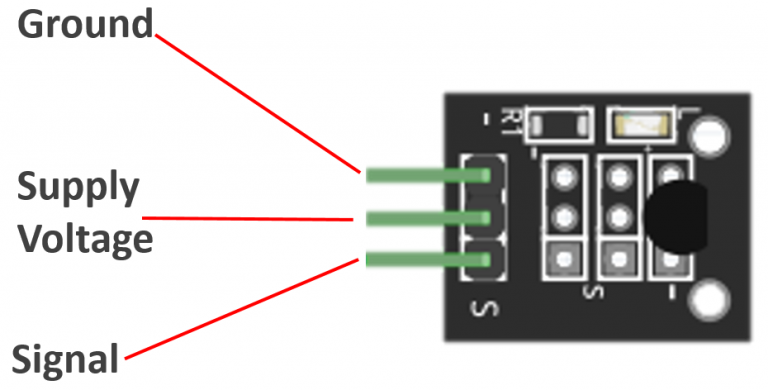
Pinout
Circuit Diagram / Wiring
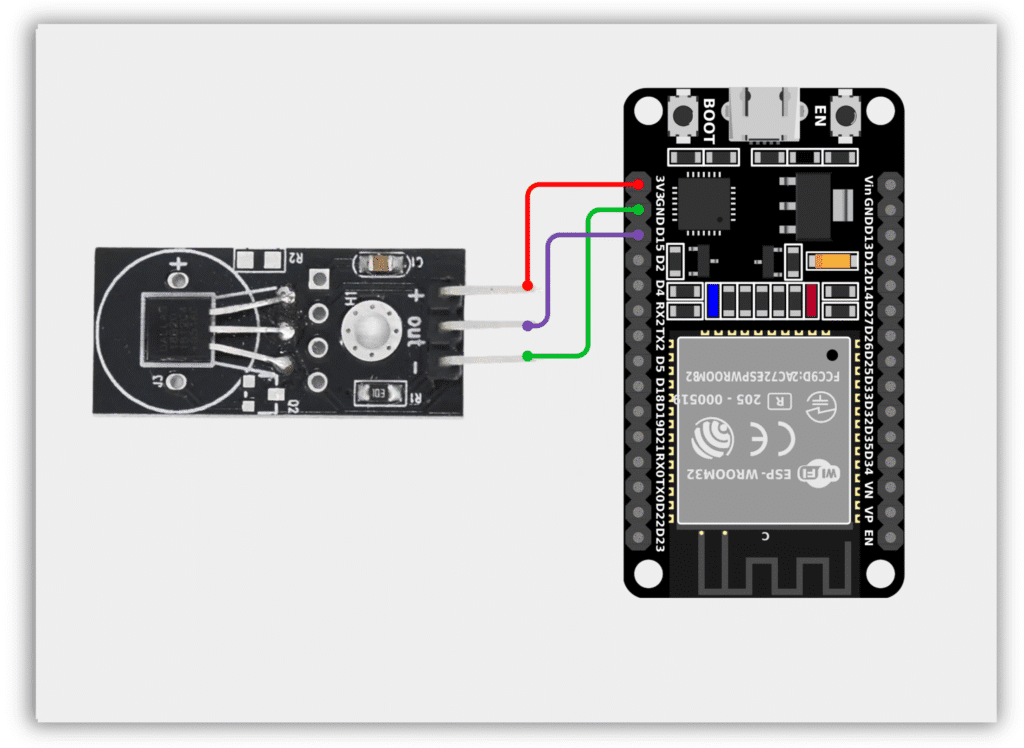
- DS18B20 VCC → 3.3V (ESP32)
- DS18B20 GND → GND (ESP32)
- DS18B20 DATA → GPIO 15 (ESP32)
Code / Programming
/*
  Filename: ol_ds18b20_sensor.ino
  Description: Reads temperature from DS18B20 sensor and prints it via Serial Monitor
  Author: www.oceanlabz.in
  Modification: 1/4/2025
*/

#include <OneWire.h>
#include <DallasTemperature.h>

#define ONE_WIRE_BUS 15

OneWire oneWire(ONE_WIRE_BUS);
DallasTemperature sensors(&oneWire);

void setup() {
  Serial.begin(115200);
  sensors.begin();
}

void loop() {
  sensors.requestTemperatures();

  Serial.print("Temperature: ");
  Serial.print(sensors.getTempCByIndex(0));
  Serial.println(" °C");

  delay(1000);
}
Explanation
- The DS18B20 communicates with the ESP32 using the OneWire protocol through GPIO 15.
- The DallasTemperature library simplifies reading temperature values from the sensor.
- The ESP32 requests a temperature measurement and retrieves the result in degrees Celsius.
- The measured temperature is displayed on the Serial Monitor every second.
Troubleshooting
- Ensure that the DS18B20 is powered correctly (VCC to 3.3V and GND to GND).
- Install the OneWire and DallasTemperature libraries using the Arduino Library Manager.
- If no temperature is displayed, check the wiring connections and sensor orientation.