Index
Introduction
The RF 433MHz Transmitter and Receiver Module is a wireless communication module used to transmit data over short distances using radio frequency signals. The transmitter sends data wirelessly, while the receiver receives and decodes the transmitted information. These modules are commonly used in remote controls, wireless automation systems, sensor networks, and communication projects. In this tutorial, we’ll interface RF 433MHz Transmitter and Receiver Modules with the ESP32 and transmit data wirelessly.
Required Components
- ESP32 Board
- RF 433MHz Transmitter Module
- RF 433MHz Receiver Module
- Jumper Wires
- Breadboard
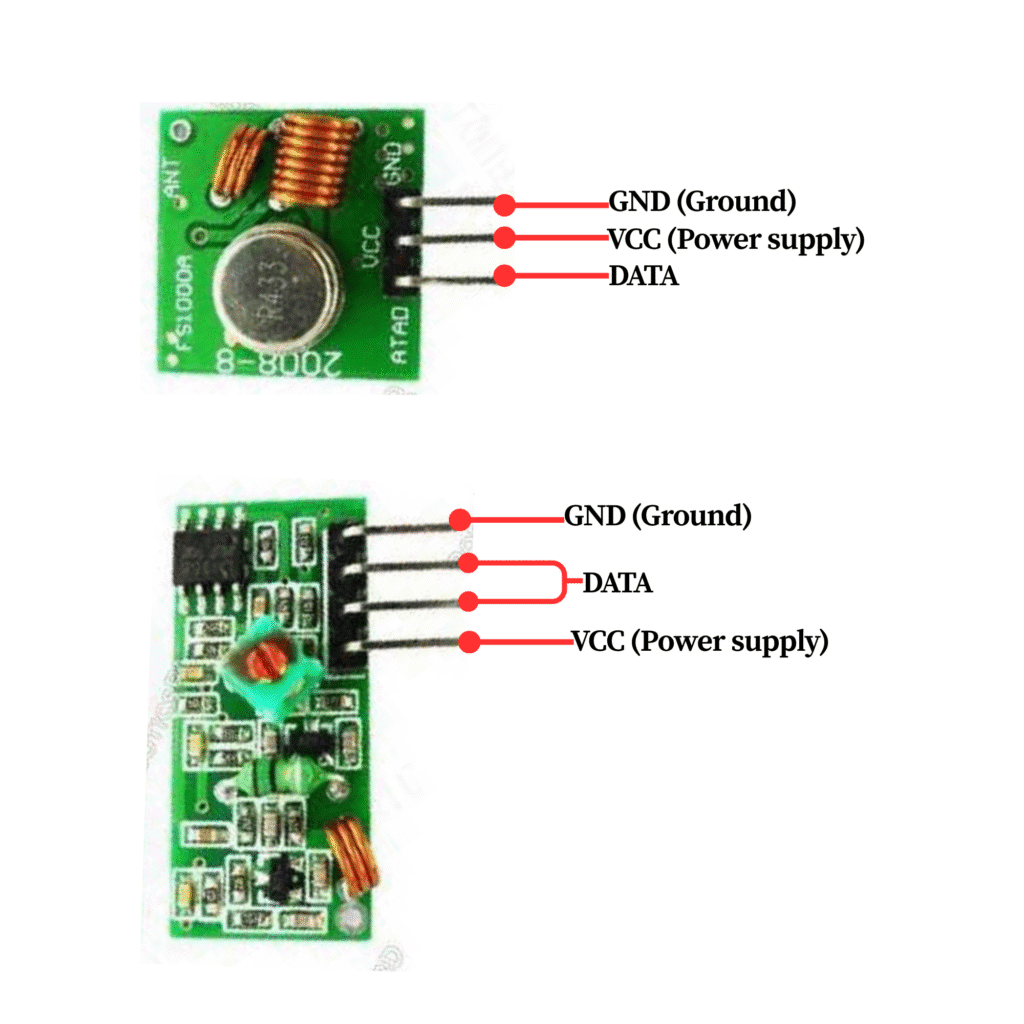
Pinout
Circuit Diagram / Wiring
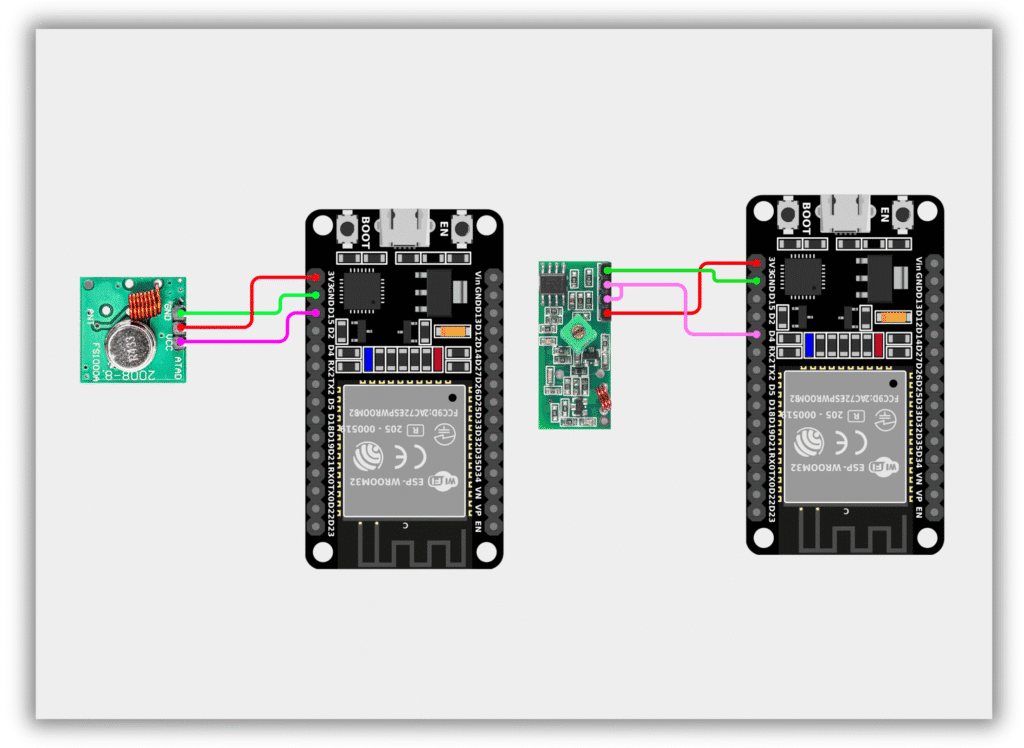
- RF Transmitter Module
- VCC → 3.3V (ESP32)
- GND → GND (ESP32)
- DATA → GPIO 15 (ESP32)
- RF Receiver Module
- VCC → 3.3V (ESP32)
- GND → GND (ESP32)
- DATA → GPIO 4 (ESP32)
Code / Programming
Transmitter Code
/*
  Filename: ol_rf433_transmitter.ino
  Description: Transmits data using RF 433MHz module
  Author: www.oceanlabz.in
  Modification: 1/4/2025
*/

#include <RH_ASK.h>
#include <SPI.h>

RH_ASK driver(2000, -1, 15, -1);

void setup() {
  driver.init();
}

void loop() {
  const char *msg = "Hello";

  driver.send((uint8_t *)msg, strlen(msg));
  driver.waitPacketSent();

  delay(1000);
}
Receiver Code
/*
  Filename: ol_rf433_receiver.ino
  Description: Receives data using RF 433MHz module
  Author: www.oceanlabz.in
  Modification: 1/4/2025
*/

#include <RH_ASK.h>
#include <SPI.h>

RH_ASK driver(2000, 4, -1, -1);

void setup() {
  Serial.begin(115200);
  driver.init();
}

void loop() {
  uint8_t buf[RH_ASK_MAX_MESSAGE_LEN];
  uint8_t buflen = sizeof(buf);

  if (driver.recv(buf, &buflen)) {
    Serial.print("Received: ");
    Serial.println((char *)buf);
  }
}
Explanation
- The RF transmitter module sends data wirelessly through a 433MHz radio frequency signal.
- The receiver module listens for incoming signals and decodes the transmitted data.
- The ESP32 uses the RadioHead library to manage communication between the transmitter and receiver.
- The transmitted message is displayed on the Serial Monitor of the receiver ESP32.
Troubleshooting
- Ensure that both RF modules are powered correctly and connected to the specified GPIO pins.
- Install the RadioHead library using the Arduino Library Manager.
- If communication fails, verify that both modules operate at 433MHz.
- Keep the transmitter and receiver within range and avoid interference from other RF devices.
- If no data is received, check the antenna connections and wiring carefully.