Index
Introduction
The TFT Display Module is a color graphical display that can show text, images, graphics, and animations. It communicates with the ESP32 using the SPI interface, providing fast data transfer and smooth display performance. TFT displays are commonly used in embedded systems, IoT devices, user interfaces, and graphical projects. In this tutorial, we’ll interface a TFT Display Module with the ESP32 and display text on the screen.
Required Components
- ESP32 Board
- TFT Display Module (ILI9341/ST7735)
- Jumper Wires
- Breadboard
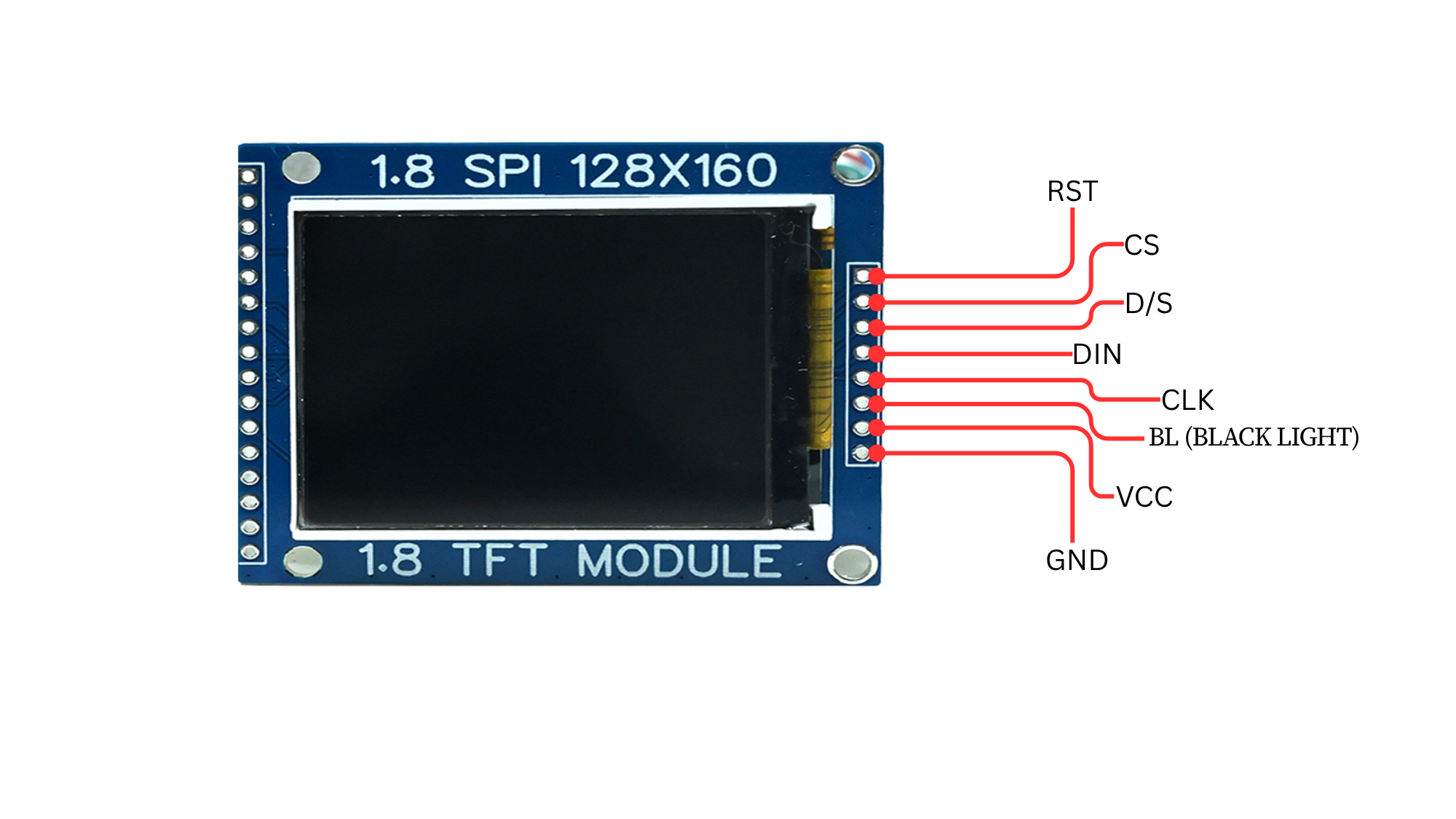
Pinout
Circuit Diagram / Wiring
TFT VCC → 3.3V (ESP32)
TFT GND → GND (ESP32)
TFT SCK → GPIO 18 (ESP32)
TFT SDA (MOSI) → GPIO 23 (ESP32)
TFT CS → GPIO 5 (ESP32)
TFT DC → GPIO 2 (ESP32)
TFT RST → GPIO 4 (ESP32)
Code / Programming
/*
  Filename: ol_tft_display.ino
  Description: Displays text on TFT display using ESP32
  Author: www.oceanlabz.in
  Modification: 1/4/2025
*/

#include <Adafruit_GFX.h>
#include <Adafruit_ILI9341.h>
#include <SPI.h>

// TFT Display Pins
#define TFT_CS   5
#define TFT_DC   2
#define TFT_RST  4

// Create TFT Display Object
Adafruit_ILI9341 tft = Adafruit_ILI9341(TFT_CS, TFT_DC, TFT_RST);

void setup() {
  // Initialize TFT Display
  tft.begin();

  // Clear Screen with Black Color
  tft.fillScreen(ILI9341_BLACK);

  // Set Text Properties
  tft.setTextSize(3);
  tft.setTextColor(ILI9341_WHITE);

  // Set Cursor Position
  tft.setCursor(20, 100);

  // Display Text
  tft.println("OceanLabz");
}

void loop() {
  // No code required here
}
Explanation
The ESP32 communicates with the TFT Display Module using the SPI interface.
The TFT screen is initialized using the Adafruit ILI9341 library.
The display background is cleared using fillScreen().
The text “OceanLabz” is displayed at a specified position using the graphics library functions.
Testing & Troubleshooting
Ensure that the TFT display is powered correctly (VCC to 3.3V and GND to GND).
Verify that the SPI pins (SCK, MOSI, CS, DC, and RST) are connected correctly.
Install the Adafruit GFX and Adafruit ILI9341 libraries using the Arduino Library Manager.
If the display remains blank, check the display driver type and wiring connections.
If text appears distorted, verify that the correct display library is selected for your TFT module.